Hopper is the app that tells you whether to book a flight now or wait. It's popular, well funded, and has been around for years. So why are people asking whether it's legit?
Because in July 2026, the US Federal Trade Commission said Hopper charged travelers fees they never agreed to — while advertising "no hidden fees".
The short answer: yes, Hopper is a legitimate company and your bookings are real. But you need to read its checkout screen carefully, and the hotel you book still needs checking.
To check a hotel before you book, look it up on Booking.com and run DoNotStay, a free Chrome extension that reads every detailed guest review and flags bed bugs, mold, noise and other red flags.
Hopper is legit — here's the background
Hopper was founded in Montreal in 2007 by Frederic Lalonde and Joost Ouwerkerk, both former Expedia executives. Its app launched in 2015 with the feature it's known for: predicting whether flight prices will go up or down. Hopper says those predictions are 95% accurate up to a year ahead.
Hopper sells flights, hotels and rental cars, and adds its own extras on top, such as Price Freeze (pay a fee to hold a price) and flexible cancellation options.
When you book through Hopper, the booking is real and the airline or hotel will have your reservation.
The $35 million FTC settlement
On July 2, 2026, Hopper agreed to pay $35 million to settle a lawsuit from the FTC.
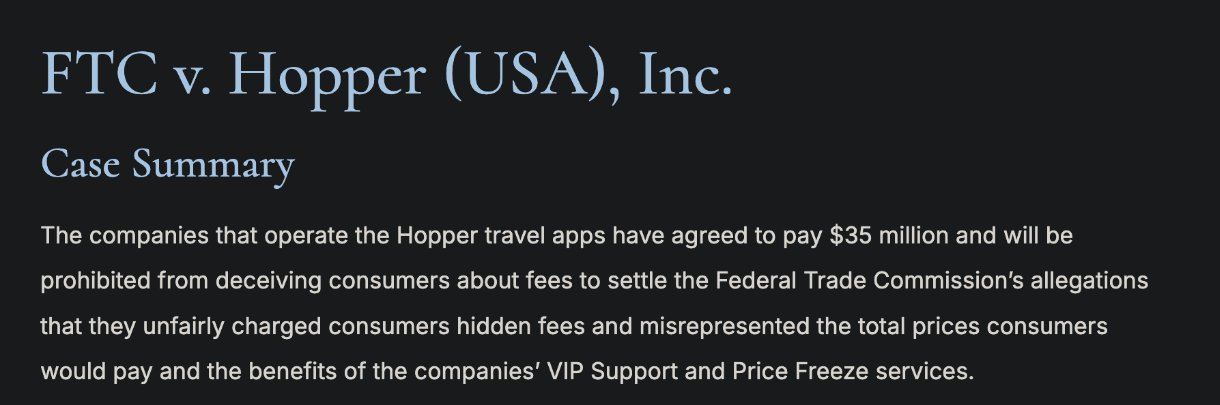
According to the FTC, Hopper advertised "No Hidden Fees" while charging travelers "Tip" and "VIP Support" fees that were switched on by default and hidden further down the checkout screen. The FTC said Hopper collected about $18 million in Tip fees and $67.6 million in VIP Support fees between 2021 and 2023, and that it misrepresented what its Price Freeze product covered.
Hopper's response: the practices were from the pandemic era, limited to the app, and stopped in mid-2023, and the FTC raised no issues with the current app.
Either way, the lesson for travelers is the same: on any booking app, the price on the button isn't always the price you pay.
What to check at Hopper's checkout
Scroll the whole checkout screen before you swipe to book. Look for add-ons that are already switched on.
Switch off what you don't want. Tips, support packages and protection products are optional.
Read the Price Freeze terms. The freeze fee isn't refunded if you don't book, and it only covers price increases up to a set limit.
Compare the final total. Check the same flight or hotel on the airline's or hotel's own site before you pay.
The real risk: the hotel itself
Hopper's prediction engine can tell you when a room will be cheapest. It can't tell you whether the room is clean or safe.
Take Luxor, the pyramid hotel on the Las Vegas Strip — a famous name you'll find on every booking app. Here's what DoNotStay found when it analyzed its Booking.com reviews:

This Las Vegas pyramid hotel suffers from widespread cleanliness issues including dirty rooms, hair in showers, moldy bathrooms, and stained furniture reported by over 20% of recent guests. Multiple serious safety incidents including unauthorized room entries and theft, combined with consistently rude staff behavior, create an unacceptable risk environment. While some guests enjoyed the unique pyramid design and location, the fundamental hygiene and safety problems make this unsuitable for any traveler.
🚩 Red Flags
Guests reported mold in bathrooms, dirty rooms, and people entering rooms that were already occupied. Saving $20 a night doesn't help if the room is one you can't sleep in.
Run DoNotStay before you book. I built DoNotStay as a free Chrome extension that reads every detailed review on a Booking.com hotel page and flags bed bugs, mold, theft, noise and scams, with quotes from the guests who reported them. Found a hotel on Hopper? Look it up on Booking.com and check it first.
So, is Hopper legit?
Yes. Hopper is a real company, and bookings made through it are real.
But it paid $35 million to settle claims about hidden fees, so treat its checkout like a contract: read every line, switch off what you don't need, and compare the final price. Then check the hotel's reviews before you commit.
Check any hotel in 30 seconds. Add DoNotStay to Chrome — free →